Working with JIRA is simpler with this chrome extension I coded:
https://chrome.google.com/webstore/detail/jira-ticket-copy/dnnhgpjgcipbklhmmjiikalolmambaem?authuser=1
it allows copy past from any JIRA ticket to your anything...
Monday, August 12, 2019

Thursday, February 9, 2017
How to restore nuget packages with Package Manager Console
Make sure your project has all the packages it needs in packages.config. Open the Package Manager Console.
Update-Package -Reinstall
Tuesday, October 11, 2016
How to upload a file with progress indicator using WEB API
I really wanted to put a very simple example on how you can upload a file using Web API and get a progress indicator on the client. The client code here is using a console application, but I tested the code with portable libraries and it should work just fine.
This is not production code! there is no security, not error handling, this is the code I used to prototype and decided to share it, it is a bare bones example.
Server code
Controller code
   public class ValuesController : ApiController
   {
        [HttpGet]
        [Route("upload/movie")]
        public string SayHello()
        {
            return "Hello World";

        }

        ///
        /// Upload a file
        ///
        /// The file information
        [HttpPost]
        [Route("upload/movie")]
        [ResponseType(typeof(List))]
        public async Task SaveFileAttachment()
        {
            List model = await FileUploader.UploadAttachment(Request);
            return Request.CreateResponse(HttpStatusCode.Created, model);
        }


    }
The helper code on the server to upload a file
  public class FileUploader
  {
        const string UPLOAD_PATH = "C:\\UPLOAD";
        public static async Task> UploadAttachment(HttpRequestMessage request)
        {

            // Verify that this is a file upload request
            if (!request.Content.IsMimeMultipartContent())
            {
                throw new HttpResponseException(request.CreateResponse(HttpStatusCode.UnsupportedMediaType));
            }

            // Create a stream provider for setting up output streams
            var streamProvider = new MultipartFormDataStreamProvider(UPLOAD_PATH);
            MultipartFormDataStreamProvider resultProvider = null;

            try
            {
                resultProvider = await request.Content.ReadAsMultipartAsync(streamProvider);

            }
            catch(Exception ex)
            {
                var x = ex.Message; // for debugging
                throw ex;
            }

            var files = new List();

            // Collect uploaded files
            foreach (MultipartFileData file in resultProvider.FileData)
            {
                string localFileName = Path.GetFileName(file.LocalFileName);
                string originalFileName = file.Headers.ContentDisposition.FileName;
                if (string.IsNullOrEmpty(localFileName) || string.IsNullOrEmpty(originalFileName))
                {
                    continue;
                }

                string fileName = originalFileName.Trim().Trim('"');
                files.Add(new FileUploadModel
                {
                    FileName = fileName,
                    LocalFullPath = Path.Combine(UPLOAD_PATH, localFileName),
                    Comment = String.Empty
                });
            }
            return files;
        }
    }
The client code
Console Application (notice there is a callback here to get the updated status)
 class Program
    {
        static void Main(string[] args)
        {
            string fileName = @"C:\Users\Public\Videos\Sample Videos\Wildlife.wmv";

            FileStream stream = File.Open(fileName, FileMode.Open);

            var response = UploadMe.UploadFile(stream, "Wild Life - uploaded.wmv", (progress) => { Console.WriteLine(progress); });

            Console.ReadLine();
        }
Client Helper
  public class UploadMe
    {
        public static async Task> UploadFile(Stream fileStream, string fileName, Action callback)
        {

            ProgressMessageHandler progress = new ProgressMessageHandler();
            progress.HttpSendProgress += new EventHandler((e, args) => { callback(args.ProgressPercentage); });

            MultipartFormDataContent content = new MultipartFormDataContent();

            // the request
            HttpRequestMessage message = new HttpRequestMessage();

            content.Add(new StreamContent(fileStream), "file", fileName);


            message.Method = HttpMethod.Post;
            message.Content = content;
            message.RequestUri = new Uri("http://localhost/UploadFileNoSecurity/upload/movie");


            var client = HttpClientFactory.Create(progress);
            client.Timeout = TimeSpan.FromHours(1);

            var response = await client.SendAsync(message);

            if (response.IsSuccessStatusCode)
            {
                Task httpResponse = response.Content.ReadAsStringAsync();
                List json = JsonConvert.DeserializeObject>(httpResponse.Result);
                return json;

            }

            return null;
        }

    }
The DTO code
namespace UploadModel
{
    public class FileUploadModel
    {

        public string FileName { get; set; }


        public string LocalFullPath { get; set; }


        public string Comment { get; set; }
    }
}
Wednesday, November 4, 2015
C# Indexer not using the propertyItem
C# will use the property
item when using indexers, but if you already have a property with that name you will have problem. To solve it use the attribute on your indexer with another name
[IndexerName("MyItem")]
Friday, October 30, 2015
Specflow - how to create steps in another assembly
For some reason having steps in another assembly doesn't always work. When I tried this I found out there is a bug with specflow, that if you don't put your step class in the root of the assembly, it might not bind it correctly. So, place your step class directly in the root (not in a sub-folder).
Also, in the app.config of your project with your feature files you need to have this configuration

Friday, March 20, 2015
Testing internal classes with C# and MSTest
put an attribute in the assemblyinfo.cs file in the project under test, pointing to the test assembly
Project under test will have
[assembly: InternalsVisibleTo("MyTest")]
Thursday, June 26, 2014
How to make Alerts fade in and fade out with Bootstrap 3.0
I wanted to make the alerts work a little nicer by using fade in and fade out. I know there are classes in the CSS to handle the fade in, but they don't work in all browsers. So I wanted to implement some Javascript to make it work
Create a div for your alerts
<div id="alerts">

</div>
We need to create unique Ids, I have used this function to do so
   function createUUID() {
        // http://www.ietf.org/rfc/rfc4122.txt
        var s = [];
        var hexDigits = "0123456789abcdef";
        for (var i = 0; i < 36; i++) {
            s[i] = hexDigits.substr(Math.floor(Math.random() * 0x10), 1);
        }
        s[14] = "4";  // bits 12-15 of the time_hi_and_version field to 0010
        s[19] = hexDigits.substr((s[19] & 0x3) | 0x8, 1);  // bits 6-7 of the clock_seq_hi_and_reserved to 01
        s[8] = s[13] = s[18] = s[23] = "-";

        var uuid = s.join("");
        return uuid;
    }
Make a function to show the alert, by adding it dynamically
function addAlert(message) {
var id = createUUID();
var JQueryId = "#" + id;
$('#alerts').append(
'');
$(JQueryId).fadeIn(5000);
window.setTimeout(function () {
// closing the popup
$(JQueryId).fadeTo(300, 0.5).slideUp(2000, function () {
$(JQueryId).alert('close');
});
}, 10000);
}
Notice that when adding the alert, it is hidden. The JQuery fadeIn API will create the fade effect when the alert is showing. Using setTimeout, we start fading out, and then closing the alert. You can play with the numbers to have the effect you want, but this seems to work nice and make alerts popup nice, and close on their own
Testing the Alerts
    $(document).ready(function () {

        addAlert("test");

        window.setTimeout(function () {
            addAlert("test1");
        }, 1000);

        window.setTimeout(function () {
            addAlert("test2");
        }, 10000);

        window.setTimeout(function () {
            addAlert("test3");
        }, 20000);

        window.setTimeout(function () {
            addAlert("test4");
        }, 20000);


    });
The code
You can see the code and the full effect here http://www.bootply.com/Sfn68ySAnBWednesday, June 18, 2014
Membership and roles as a WCF service
In case you want to have your membership and roles exposed as a service
Click here for more informationHow to create a web thumbnail
I found a lot of tools that do this but I think the one I am going to really give a try is this one
webthumbnail.orgAnd I am going to try to add a link to CNN here:
Wednesday, June 4, 2014
How to make technical demos better
If you are showing code, a power point and then switching to a view of the application it can be challenging so here are some tips to improve your technical demo
I don’t want to see your dog
You should not show your family or dog in your background, it is better to keep your background black or with a logo of your demo or company. You should also consider that it takes longer to render images when people view your demo in a remote location.
I don't want to see e-mail popups
I don’t want to see an e-mail pop from your wife telling you to pick up milk on the way home during a demo. For the demo, consider sharing your secondary monitor and not the main monitor. This way you don’t need to close all these items on the task bar, you don’t want to show what you have open to everyone. It also solves the issues of notifications from e-mail. Normally these e-mails notifications can pop during the demo and normally they are on the main screen. Putting your demo on the secondary screen will make sure no one sees these notifications. Of course, you can also just close your e-mail program before the demo.
I can’t see that! Can you make it bigger?
Well, there is an app for that. Download the application ZoomIt and it will allow you to zoom into parts of the screen you want to explain. ZoomIt has cool features that allows you to draw arrows and boxes around items on your screen. The best part is that it’s free!
Hold on let me find that code…
Nothing is more annoying than a developer looking for the code he wants to show in the solution. The solution to this is actually simple. In Visual Studio use Bookmarks, using bookmarks you can mark the parts of the code you want to go to. Bookmarks can be enabled from the Edit Menu. You can see all your bookmarks in a bookmark view window (in the View menu).
Oh no! Not another slide
Don’t make too many slides full of text – no matter what you are showing you are likely to put your audience to sleep. Keep your slide short, put more graphics and diagrams into them. The reason is simply because the human brain works better with visuals. However, keep most of your demo interactive as much as possible. Best demos can be when you code with the audience and explain what you are doing. Which brings me to my next point...
How do I code without errors during my demo?
If you choose to be brave and code during the demo, you better make sure your code will work. The best way to know your code will work, is to code everything and test everything before the demo. If you have a working version of your code, launch it on the main screen, and share your secondary screen with the audience (running a second version of Visual Studio). You can also have notepad with code snippets on the main as a reference. Copy pasting is another technique, however, don’t use copy past too much, you may lose the audience with large snippets. Best thing is to type it as you go… this way you keep everyone watching…
The cool thing is that your audience doesn't know you have a working reference on the first screen, and they can't see your task bar (showing 2 version of Visual Studio), so to everyone it looks like you are doing it from memory and on the fly. Making you look like a true Master Jedi.
How to make sure people are not falling asleep
Try to keep the subject interesting, pop a few jokes and get your audience to participate. A few tips to get the audience involved is to simply ask them questions. Take breaks in the demo, and let the audience have a chance to ask questions and go into more details.
So there it is – have a great demo and good luck not getting that blue screen.
Tuesday, June 3, 2014
How to do Control-Alt-Delete on Remote Desktop
I am tiered of looking this up all the time, so here it is:
Press: CONTROL-ALT-END
Sunday, June 1, 2014
Knockout, Mapping plug-in, Typescript and ASP.NET MVC playing nice.
MVVM
In this article I will show how you can use the MVVM pattern to the fullest using the Knockout.JS framework, with the mapping plug-in add-on. The goal of this article is to show that you can define your view model at the back-end only, and have it "mapped" dynamically at the client side without the need to code it by hand. To make the coding simpler I have decided to use Typescript and test it with JQuery, and Knockout. You can learn more about the mapping plug-in here.
Typescript
To learn more about typescript I recommend you visit this site.Lets get the environment setup
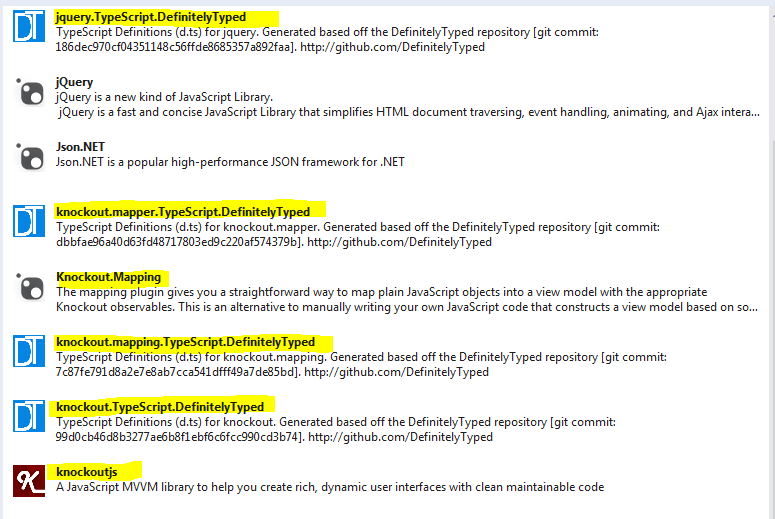
You will need to get a few Nuget packages to get going... here are some of them:
"
Next you will create a new TypeScript file and add the following dependencies:

The ViewModel
Notice that I only define the view model properties at the back-end. You will not see the fields of the ViewModel on the client side
    public class DomainItem
    {
        public string Name { get; set; }
        public string Description { get; set; }
    }

    public class DomainViewModel
    {
        public DomainViewModel()
        {
            Items = new List();
            Status = "Loaded";
        }
        public string Name { get; set; }
        public List Items { get; set; }
        public string Status { get; set; }
    }
The Controller
    public class HomeController : Controller
    {
        //
        // GET: /Configuration/
        public ActionResult Index()
        {

            return View();
        }

        //
        // GET: /Configuration/Details/5
        public ActionResult List()
        {
            DomainViewModel vm = new DomainViewModel();
            vm.Name = "Name1";

            var list = new List();
            vm.Items.Add(new DomainItem { Name = "item 1", Description = "This is item 1" });
            vm.Items.Add(new DomainItem { Name = "item 2", Description = "This is item 2" });
            vm.Items.Add(new DomainItem { Name = "item 3", Description = "This is item 3" });

            return Json(vm, JsonRequestBehavior.AllowGet);
        }

        public ActionResult Refresh()
        {
            Random random = new Random();
            int number = random.Next(1, 50);

            DomainViewModel vm = new DomainViewModel();
            vm.Name = "Name" + number;
            var list = new List();

            for (int i = 0; i < number; i++ )
            {
                vm.Items.Add(new DomainItem { Name = "item " + i, Description = "This is item " + i });
            }

            return Json(vm, JsonRequestBehavior.AllowGet);
        }

        [HttpPost]
        public JsonResult SubmitViewModel(DomainViewModel viewModel)
        {
            viewModel.Status = "Saved...";
            return Json(viewModel);
        }
     }
Listreturns list of items, this data will be converted into a view model on the clientRefreshsimulates a data update on the back-end and sending the updated the data to the clientSubmitViewModelSimulates a save operation on the view model, and updating the status field to "Saved..."
The Dynamic ViewModel base class (in Typescript)
This is the base class that holds the necessary operations to dynamically map the view model from the server into the client. It also contains some re-usable flags to indicates if we are in the process of getting data from the back-end, I use this data to notify the user when communication with the back-end occurs.
class DynamicViewModel {

    // set to the true when the data is loaded from the back-end
    isLoaded = ko.observable(false);

    // set to true while the data is loading from the back-end
    isLoading = ko.observable(false);

    constructor() {

    }


    // show a hidden html id
    show(id: string) {
        $(id).show();
    }

    // does an http get to the server, take a url returns the viewmodel. Once the request
    // is done, the view model is added to this class
    httpGet(url: string, callback?: (vm) => void) {

        // keep a pointer to this view model
        var self = this;

        // update flags
        self.isLoaded(false);
        self.isLoading(true);


        // make the REST call using GET
        $.ajax(url, {
            type: "GET",
            cache: false,
        }).done((vm) =>
        {
            // map the view model data we got from the server into this viewmodel
            ko.mapping.fromJS(vm, {}, self);

            // update flags
            self.isLoaded(true);
            self.isLoading(false);

            // if there is a callback, then call it.
            if (callback !== undefined)
                return callback(vm)
        });
    }

    // makes a post call to the server, and updates the viewmodel response
    httpPost(url: string, onSuccess?: (vm) => void) {

        // keep a pointer to this viewmodel
        var self = this;

        // update flags
        self.isLoaded(false);
        self.isLoading(true);

        // make a POST call to the server
        $.ajax({
            url: url,
            type: 'post',
            // pass this viewmodel
            data: ko.mapping.toJSON(self),
            contentType: 'application/json',
            success: function (vm) {
                // update flags
                self.isLoaded(true);
                self.isLoading(false);

                // update the view model
                ko.mapping.fromJS(vm, {}, self);

                // if there is a callback, call it
                if (onSuccess !== undefined)
                    return onSuccess(vm);
            }
        });
    }
}
ko.mapping.fromJS(vm, {}, self);this is the code that dynamically expends the view model, and adds the observable items based on the JSON coming back from the back-endko.mapping.toJSON(self)is used to serialize the view model to JSON so it can be sent to the back-end (it is used on the post)- Making making a post to the server, to send the view model, the
code ko.mapping.toJSON(self)the magic - Notice that I had to use self, that's because the this keyword changes scope even with Typescript
- the url will be passed from the child class
Child ViewModel
class DomainViewModel extends DynamicViewModel {
    initUrl: string;
    postUrl: string;
    refreshUrl: string;


    constructor(initUrl: string, refreshUrl: string, postUrl: string) {
        super();
        this.initUrl = initUrl;
        this.postUrl = postUrl;
        this.refreshUrl = refreshUrl;
    }

    // Initialize the view model for the first time.
    initializeAction() {

        super.httpGet(this.initUrl, (data) =>
        {
            // apply the binding
            ko.applyBindings(this);

            // show the window
            super.show("#Main");
        });
    }


    // Update the data on the UI
    updateAction() {

        super.httpGet(this.refreshUrl);
    }

    submitAction() {

        super.httpPost(this.postUrl);
    }
}
Notice that the DomainViewModel deals mostly with commands and doesn't actually define the data in the view model. This is because the base class will handle injecting the data in when doing a GET or a Post
The View
@{
    ViewBag.Title = "Index";
}

@section scripts
{

    <script type="text/javascript">
        $(document).ready(function () {

            // get some url configuration for the view model to do its work
            var initializeUrl = "@Url.Action("List")";
            var refreshUrl = "@Url.Action("Refresh")";
            var submitUrl = "@Url.Action("SubmitViewModel")";

            var domainViewModel = new DomainViewModel(initializeUrl, refreshUrl, submitUrl);

            // initialize the view model
            domainViewModel.initializeAction();
        });

    </script>

    @*typed scripted geneated*@
    <script src="~/Scripts/TypeScript/ViewModel.js"></script>
}

<h2>Configuration Controller</h2>
<div id="Main" class="part" style="display : none">
    <div class="part">
        <h3>Binding to a selection box</h3>
        <select data-bind="options: Items,
                       optionsText: 'Name',
                       optionsCaption: 'Choose...'" size="5" multiple="true"></select>
    </div>

    <div class="part">
        <h3>Binding to a text box</h3>
        <input type="text" data-bind="value: Name" />
    </div>

    <div class="part scrollDiv">
        <h3>Binding to a table</h3>
        <table class="table">
            <thead>
                <tr><th>First name</th><th>Last name</th></tr>
            </thead>
            <tbody data-bind="foreach: Items">
                <tr>
                    <td data-bind="text: Name"></td>
                    <td data-bind="text: Description"></td>
                </tr>
            </tbody>
        </table>
    </div>

    <div class="part">
        <label data-bind="text: Status"></label>
    </div>
    <div class="part">
        <button data-bind="click: updateAction">Refresh data</button>
    </div>

    <div class="part">
        <button data-bind="click: submitAction">Submit data</button>
    </div>


    <div class="part">
        <label data-bind="if:isLoading">Loading from server...</label>
        <label data-bind="if:isLoaded"> Loading from server... done</label>
    </div>

</div>
No need to code the ViewModel by hand in Javascript anymore
So thanks to the mapping plug-in for knockout, you don't need to worry about typing all the view model observable by hand anymore. You can use the base class view model and use it to do most of the work for you. This code is not production quality code, and only used to show the use of a dynamic view model using the knockout mapper plug-in
.The full code
Click here for the full source code (compiled with Visual Studio 2013 Update 2)Wednesday, May 28, 2014
Friday, May 23, 2014
SCRUM - How to deal with a team that doesn't talk
So you are the SCRUM Master and you are in a team that no one likes to talk or you have very shy people. How do you deal with this… here is a list of tools that can help:
- Use voting with your hand when making decisions. The technique is called fist of five voting (click here for more info)
- Setup one on one meeting with every team member to see how they are doing during the sprint. They might open up more when it is just the two of you.
- During the SCRUM ask each person by name how they are doing or if they are stuck. Don’t use generic questions such as “Is anyone stuck?”
- Don’t make decisions for the team – try to encourage discussion and consensus. Do this by asking questions to people by name. For example “Tom what do you think about this idea?” Use first of five to get the feedback from the group when you think you reached a consensus
- Keep meeting with the group low-stress and fun so people don’t feel on the spot or stressed, bring snakes or make jokes to keep the mood light
- Managers attending SCRUM can cause team members to speak less, worrying that they may look bad if they are stuck. In this case, work with the manager or team member and explain that they should not worry about speaking up or saying that they are stuck.
Thursday, May 15, 2014
SCRUM - Should you add a story to the sprint backlog mid sprint?
The question here is not that there is an emergency story that needs to be done ASAP. The situation is that there are free people during the sprint that are asking to bring a new story into the sprint. Although this sounds tempting - as a SCRUM Master you have to be careful. Even if a developer can bring a story and do the development - there might be no time for QA or documentation to be done. One idea is bring another story and start the development, the testing and documentation can be done in the following sprint - terrible idea. This will first most likely violate your own definition of done and create a QA debt that will be carried over to the following sprint. Instead, focus on working as team more, and my advice is that if someone is free, let him help someone that is not free. There are items in progress that need to be done, so let any free person assist in any way possible a busy person. They can pair, one can do the code and the other can write the unit tests. They can split the work (tasks) between them - anything to help would be beneficial. What you don’t want to have is 10 stories in progress by 10 people – each one doing his or her own story and swimming in his or her own private lane. You want people to help each other, work together, sit together, and work as a team. However, although I feel helping someone else is the best option, sometimes everyone is doing fine and they don’t need help. Then what? What do you do if you finished everything?
So I created this little chart to help you out with this…
I am free! and I want to bring a story to the sprint backlog (mid-sprint)

Monday, April 21, 2014
WCF Service with no SVC file and no Endpoint configuration sample
I put this quick example so I have all the configuration settings I need in one simple example
Click here for the link to the codeFriday, April 18, 2014
Visual Studio 2012 stop responding on start-up....possible fix
I don't really know what happened to my Visual Studio 2012 but removing and re-installing did not work. Visual Studio kept not responding when loading up. Finally what seems to have solved it was this simple command line: devenv /ResetSettings. I hope this saves you time...

Saturday, April 12, 2014
How to debug the Seed() method when using EF 6.0
Add this to the Seed() method
  if (System.Diagnostics.Debugger.IsAttached == false)
      System.Diagnostics.Debugger.Launch();
I have tried to use System.Diagnostics.Debugger.Break(), but that crashed visual studio.
NuGet putting the references in a diffrent folder location
I didn't like the default folder Nuget used to put the references. to change the default do the following:
- Create a
nugget.configfile under the solution - Put the following xml in it
- Add your nugget packages
<configuration>
  <config>
    <add key="repositoryPath" value="..\Bin\Packages" />
  </config>
  ...
</configuration>
That's it... you should see your references in a bin\packages folder.
(Tested in Visual Studio 2013)
Subscribe to:
Posts (Atom)